Retro Gaming Console 20 000+ Retro Game Stick 23 Emulators 4K HD HDMI TV Game Stick Includes 2 Wireless 2.4GHz Controllers Plug & Play Video Games for TV(64GB)
Product Description
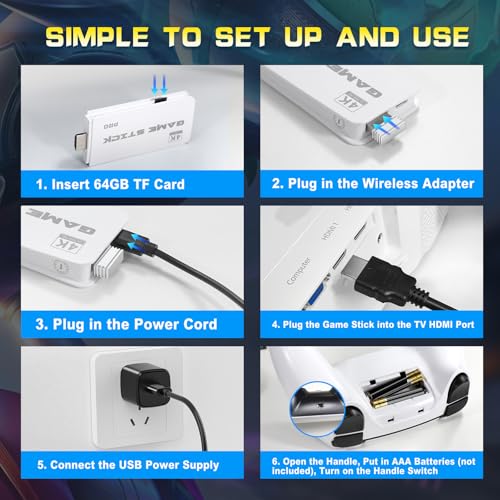
How to Set the Wireless Retro Game Stick 1. Insert the TF card into the controller before connecting the power supply. 2. Plug the game stick into the HDMI port of your TV or computer. 3. Connect to power then the console will automatically turn on. 4. Utilize the game controller to choose the desired game from the menu. Product Includes: 1 X Game Stick 2 X Wireless Controllers 1 X HDMI Cable 1 X Usb Cable 1 X 64G TF Card 1 X User Manual If the retro stick does not work the device may not properly connected you can check as following steps: 1. Make sure the switch of the controller is in the ON state. 2. Make sure the controller is lit red or green (red for player 1 green for player 2); 3. Make sure the Bluetooth wireless receiver is well inserted into the retro stick; 4. Make sure the stick lights up blue; 5. If the connection is correct the primary contro